Add-ins disabled by Microsoft
If dStyle365 (LegalWord365) does not start, there can be several reasons:
- dStyle365 (LegalWord365) cannot find the "Shared" (or "Config") folder
- Microsoft Outlook has disabled dStyle365 Outlook (or LegalWord365 Outlook) in the application
- The registry keys are set to load behavior 2 by Microsoft
dStyle365 (LegalWord365) cannot find the "Shared" (or "Config") folder
dStyle365 (or LegalWord365) consists of two parts: the Content and the Shared (Config) folder. When the Shared (Config) folder cannot be found, the ribbon is not loaded.
Check if the path to Shared (Config) exists locally and/or on the network: Reg settings for Shared
Microsoft Outlook has disabled dStyle365 (LegalWord365) in the application
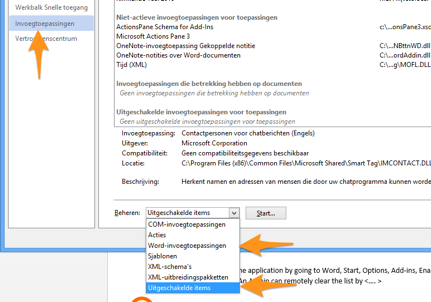
When an add-in loads too slowly, Microsoft Outlook gives the user the option to disable it. When a user clicks Yes, the application is disabled and placed on the "disabled list."
The user can enable the application by going to Outlook (or Word), Home, Options, Add-ins, Enable Add-ins and selecting dStyle365 or LegalWord365.
The Registry keys are set to load behavior 2 by Microsoft
The result of missing the Shared (Config) folder can lead to Microsoft completely disabling dStyle365 (LegalWord365). This happens within the Office registry and not in the Documentaal add-in's registry settings.
Changing the "load behavior" does not work.
Administrators can remotely clear the following keys to clear the disabled add-in list. Afterwards, update the load behavior to 3.
HKEY_CURRENT_USER\\Software\\Microsoft\\Office\\officeversion\\application\\Resiliency\\DisabledItems
officeversion => 12.0 (2007), 14.0 (2010), 15.0 (2013), 16.0 (2016)
application => Word, PowerPoint, Outlook, Excel
See also the article on Add-in Load Behavior.