In Microsoft Word, tabs and indents are both features that allow you to adjust the positioning and alignment of text, but they work in different ways and have different applications.
In dStyle365/LegalWord365, your organization's styles are neatly pre-defined based on your corporate identity. You can find the styles in a convenient Formatting panel, where the indentation of the various styles is already included. In addition, the indentation across all styles, numbered lists, and multi-level lists is uniformly constructed, ensuring a beautifully structured document.
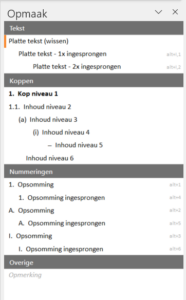
Below is a brief overview of the difference between tabs and indents in Microsoft Word:
Tabs:
- Tabs are used to move text to specific positions on the ruler at the top of the Word window.
- Tabs are set at specific points on the ruler and act as jump points for the cursor or text when you press the Tab key.
- Tabs are useful for aligning text in columns, creating organized lists, and marking position points in a document.
- Tabs can have different types, such as left, right, center, decimal, etc.
Indents:
- Indents control the horizontal position of a paragraph or a series of paragraphs.
- Indents are set for the entire paragraph and affect all lines within that paragraph.
- Indents can be set using the ruler at the top of the Word window or through the "Paragraph" dialog box.
- Indents are used to emphasize the structure of a text, such as indenting the first line of a paragraph (first-line indent) or creating a hanging indent where the first line protrudes outwards.
- Indents can also be used to mark paragraphs at different levels in a hierarchical list.
In summary, tabs are used to move and mark text at specific positions, while indents determine the horizontal position of paragraphs. Tabs are useful for text alignment and organization, while indents help with the structure and hierarchy of paragraphs. Both functions contribute to a neat and structured document layout.