Create default profile
One profile can be set as default. This profile will then always be shown first when creating documents or emails. Go to Settings. Select the desired profile from the list of Favorite central profiles or Personal profiles and click the Default button.
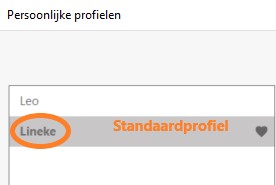
The profile set as Default is displayed in bold and has a heart icon next to it. Of course, when creating a document, you can always choose one of your other favorite profiles.
Benefits of a default profile
- Faster document creation
- Consistent starting points
- Fewer clicks when starting
- Personal workflow optimization
Tips
- Choose the profile you use most often
- You can always change the default profile
- The default profile only applies to your account