Ga naar hoofdinhoud

    Wij respecteren uw privacy

    Wij gebruiken cookies om uw ervaring te verbeteren, verkeer te analyseren en onze diensten te optimaliseren. U kunt uw voorkeuren aanpassen of alle cookies accepteren.

    Meer informatie in ons privacybeleid en cookiebeleid.

    👋 Hoi! Ik ben je AI-assistent

    Ik help je graag met vragen over documentautomatisering, Microsoft 365 en onze oplossingen!

    email signature
    dStyle365
    LegalWord365
    settings
    outlook

    Email Signature Options

    Configure email signature options in dStyle365/LegalWord365: automatic insertion, profile selection, or manual adjustment.

    Published on December 27, 2025
    1 min read
    Documentaal knowledge center

    Email Signature Options

    In the dStyle365/LegalWord365 ribbon, go to Settings > Language and email signature.
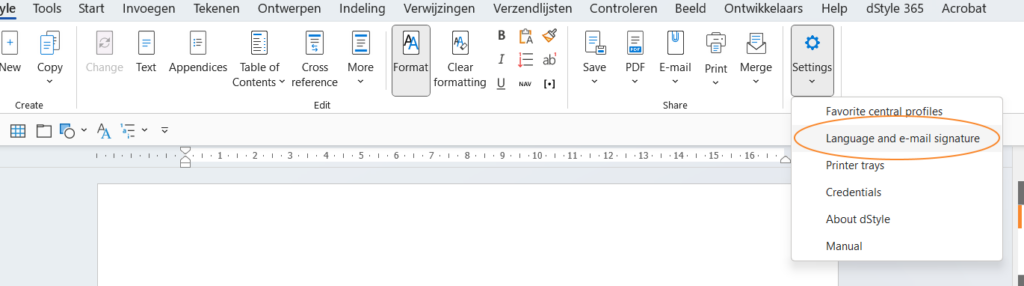
    Language and email signature settings

    There are three options: 'Automatic insertion', 'Choose profile' which displays a popup with the profiles, and 'No automatic signature'. Click the OK button to save the chosen setting and close the screen. The email signature can always still be adjusted using the 'Signature' button.
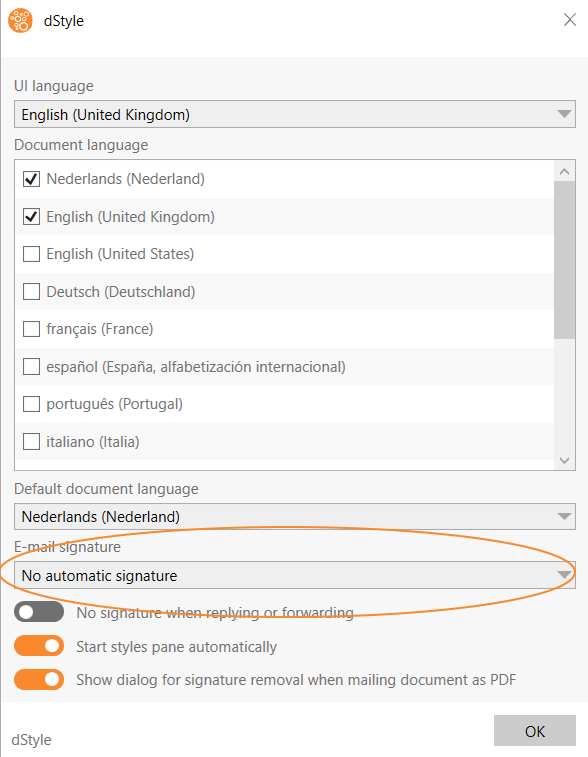
    Email Signature Options

    Related articles

    Discover more articles

    View more guides and tips in our knowledge center