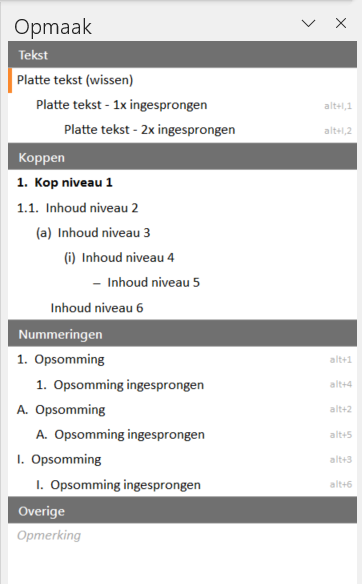
A multilevel list in Microsoft Word is used when you want to organize information hierarchically and add sub-items. In DStyle/LegalWord365, we ensure that your multilevel lists are available in your organization's corporate identity, meaning with the correct font, font size, and proper indentation, in the Formatting pane, so you can access them with a single click.
Below are some situations where you might use a multilevel list:
Table of Contents
When creating a table of contents for a document, you can use a multilevel list to structure chapters, subsections, and sub-subsections. Each level of the list corresponds to a specific hierarchical level in the document.
Example:
1. Introduction
1.1 Background
1.2 Objectives
2. Methodology
2.1 Data Collection
2.2 Analysis
Hierarchical Information
If you have information that has a hierarchical structure, such as organizational structures, classification systems, or categorizations, a multilevel list is useful for showing the relationships between items.
Example:
- Animals
- Mammals
- Dog
- Cat
- Birds
- Pigeon
- Parrot
- Mammals
Step-by-step Plans with Subprocedures
If you have a complex step-by-step plan where certain steps require subprocedures, you can use a multilevel list to structure the main steps and their corresponding substeps.
Example:
1. Preparation
1.1 Gather materials
1.2 Prepare workspace
2. Execution
2.1 Perform step A
2.2 Perform step B
A multilevel list thus helps visualize the hierarchical structure of information and makes it easy to organize sub-items. It provides a structured and clear presentation of complex information, allowing the reader to easily understand the relationships and levels.
More information
For more information, please visit our partner Microsoft's website: