translated
    documentation
    profile
    settings
    dStyle365
    LegalWord365
    Outlook

    Make your own profile default

    Make your own profile default so that your name is automatically used as the signer and author of documents and in Outlook signatures.

    Published on December 7, 2025
    1 min read
    Documentaal knowledge center

    Make your own profile default

    Before you start working with dStyle365/LegalWord365, make your own profile default. This will ensure your name is automatically used as the signer and author of documents or in Outlook signatures.

    Click on your profile picture (or initials) in the top right corner of the menu.

    A settings screen will appear. Click on Profile Management.
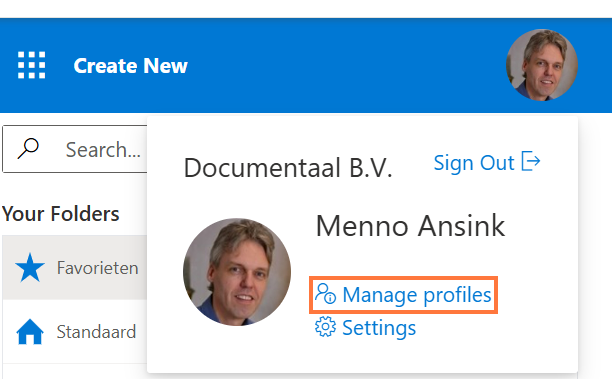
    Settingsmenu

    Find your own name, and click on the star icon next to it.
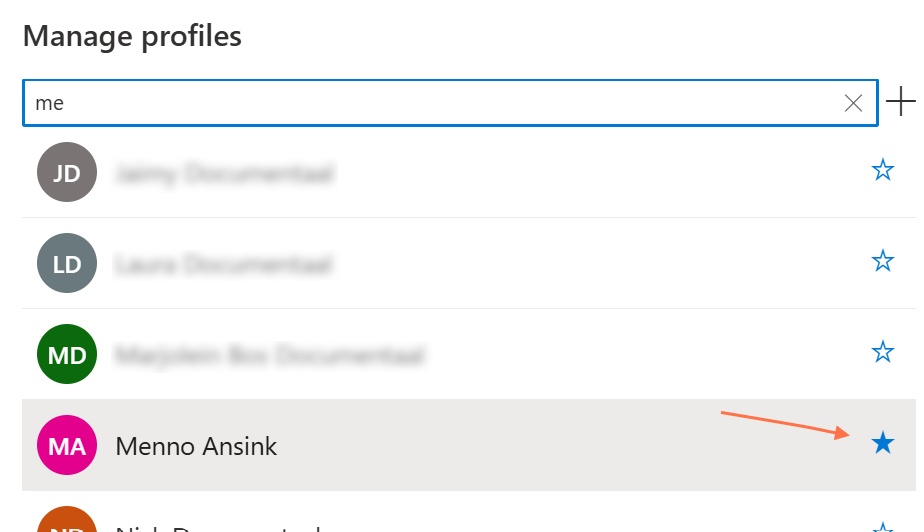
    Make profile default

    Discover more articles

    View more guides and tips in our knowledge center