Indenting is a feature in Microsoft Word used to adjust the alignment and positioning of text and paragraphs. It helps in creating structured and tidy documents.
To set indents in Microsoft Word, follow these steps:
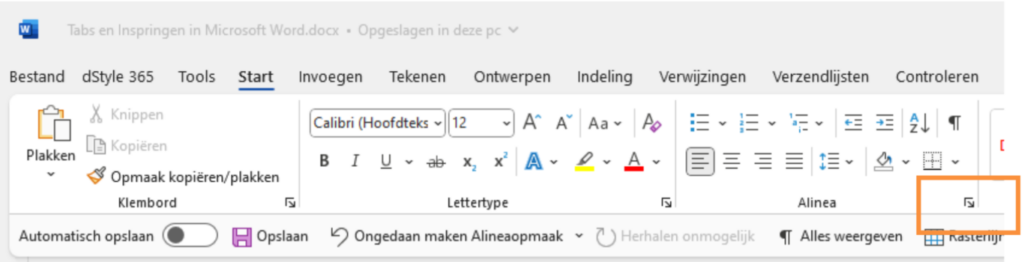
Click the arrow in the bottom right corner of the Home tab, in the Paragraph window.
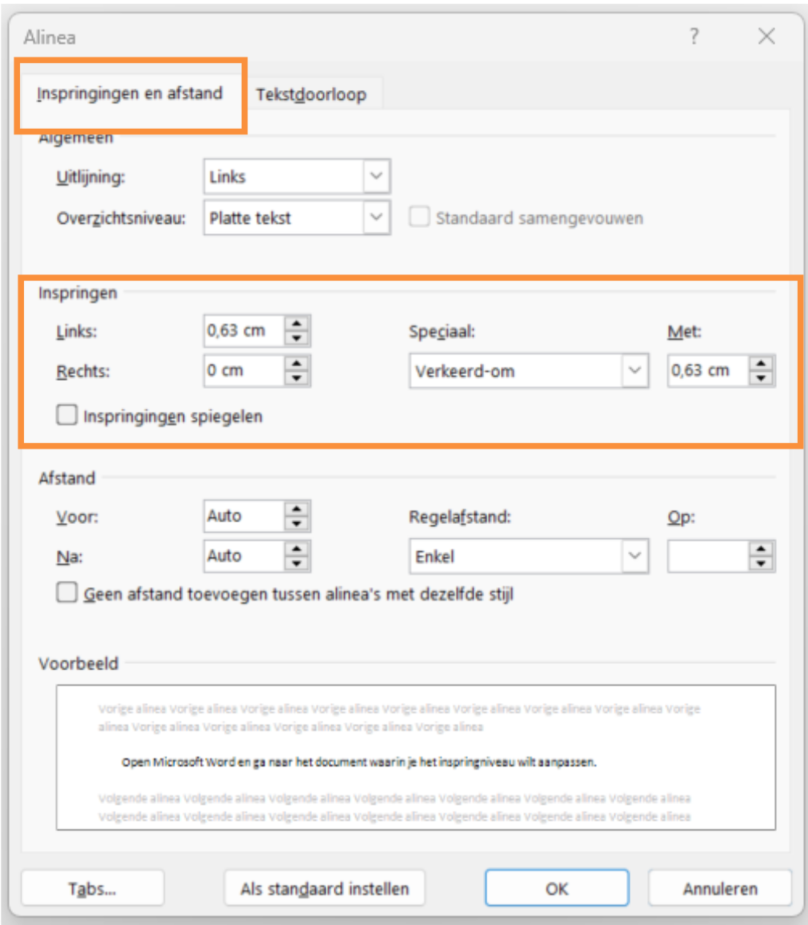
Then click the Indents and Spacing tab. In addition to adjusting the alignment and spacing before and after the style here, you can also adjust the indentation. Use the up and down arrows to increase or decrease the indent, or enter a specific number. There are also special options, for example, to indent only the first line or to create a hanging indent for subsequent lines. Click the OK button to save your changes and close the window.
By adjusting the indent level, you can control the formatting of paragraphs in your document. This is useful for creating structured text, such as poems, essays, bullet points, or any other text you want to emphasize or display differently from the standard alignment.
More information
For more information, also refer to our partner Microsoft's website: